Legal
Text Message Terms
The terms for text messages from Si Call, Inc. and from businesses that use Si Call, Inc.
Plans open at launch. Nothing can be bought yet.
On this page
Texting is starting in stages. Apart from automatic answers to STOP, HELP and START, no text is sent until the number it comes from has been approved by the carriers. Sí Call alerts start for a person once they confirm their number. A business's receptionist offers to text its callers only once that business's own texting number is approved.
1. Two Kinds of Text
There are two kinds of text message, and each needs its own yes:
- Sí Call alerts are sent by Si Call, Inc. to the owners and admins of a business that uses Si Call, Inc., about calls to that business's line.
- Business texts are sent by a business that uses Si Call, Inc. to a person who called it, about their booking or request.
Saying yes to one kind never signs you up for the other.
2. Sí Call Alerts
Who gets them. An owner or admin of a business on Si Call, Inc. who asks for them. In the dashboard, under Settings, then Notifications, they enter their own mobile number and tick an unticked box that reads “Text me alerts at this number”. Next to the box it says: “Sí Call will text you about new calls, callbacks, bookings and urgent calls, based on your choices below. Up to 10 texts an hour. Message and data rates may apply. Reply STOP to stop, HELP for help. You don't need this to use Sí Call.”
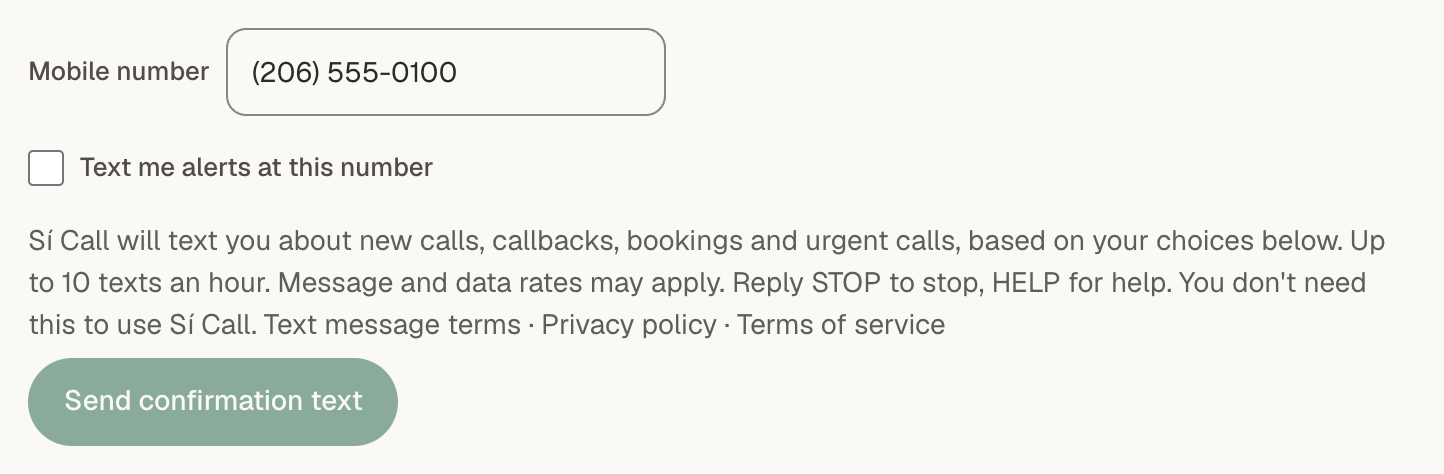
Confirming the number. We then send one text to that number, asking the person to reply YES. Nothing else is sent to the number unless it replies YES. After the YES, we send one text saying alerts are on.
What they say. The business's name, what happened (new call, new callback request, new booking or urgent call) and a link to the dashboard. They never include a caller's name, number, reason for calling or words. For example:
Sí Call · Maple Street Salon: new call. Open: https://sicall.ai/app/conversations
How often. Message frequency varies with the business's calls and the person's own choices, and is never more than 10 texts an hour. The person chooses which calls they hear about, and can turn texts off or remove their number in the same place they added it.
Optional. Nobody needs these texts to use Si Call, Inc. The dashboard and the call emails work the same without them.
3. Texts From a Business to Its Callers
Who gets them. A person who calls a business that uses Si Call, Inc., and who says yes on the call when the business's receptionist asks whether it may text them, for example about the appointment they just booked. The yes covers only what was asked about: a yes to texts about a booking covers that booking's confirmation, reminder and change notices, and nothing else.
Who sends them. The business, from its own texting number, and each text names the business. Si Call, Inc. sends them for the business.
How often. Message frequency varies: only the texts the caller agreed to on the call, such as a booking confirmation and a reminder, and a notice if the appointment is moved or cancelled.
4. Message and Data Rates
Message and data rates may apply, depending on your mobile plan. Si Call, Inc. does not charge anyone to receive a text.
5. Help and Stopping Texts
- Stop: reply STOP to any text to stop texts. STOPALL, UNSUBSCRIBE, CANCEL, END, QUIT, REVOKE, OPTOUT and OPT OUT work too, sent on their own. A reply that starts with STOP, such as “Stop texting me”, also stops them. A STOP to any number that sends these texts stops texts from all of them, not only the one you replied to.
- Start again: reply START or UNSTOP to a number to get its texts again. That starts texts from that number only.
- Help: reply HELP or INFO for help. You can also write to support@sicall.ai or use our contact page.
An owner or admin can also turn Sí Call alerts off, or remove their number, under Settings, then Notifications, in the dashboard.
6. Delivery
Carriers are not liable for delayed or undelivered messages. A text can arrive late or not at all, so the dashboard, not a text, is the record of a business's calls.
7. Privacy
We use a mobile number only to send the texts its owner agreed to, to pass a text sent to a business's number on to that business, and to honour STOP and HELP. Mobile numbers are not shared with third parties or affiliates for marketing or promotional purposes, and text message opt-in data and consent are not shared with any third parties. Section 2.5 of our Privacy Policy says more, and section 2.1 of our Terms of Service covers texting for businesses that use Si Call, Inc.
8. Contact
Help with texts: support@sicall.ai
Privacy: privacy@sicall.ai